Menu Close

Category: Blog

{Do you know} Business impact of Copilot Studio Agents in Viva Insights

Hello Everyone,

Today I am going to share my thoughts on analysing the business impact of Copilot Studio Agents in Viva Insights.
Let’s get started.

Copilot Studio Agents integrated within Microsoft Viva Insights help organisations enhance employee productivity, well-being, and collaboration by providing AI-driven personalised recommendations and automated assistance.
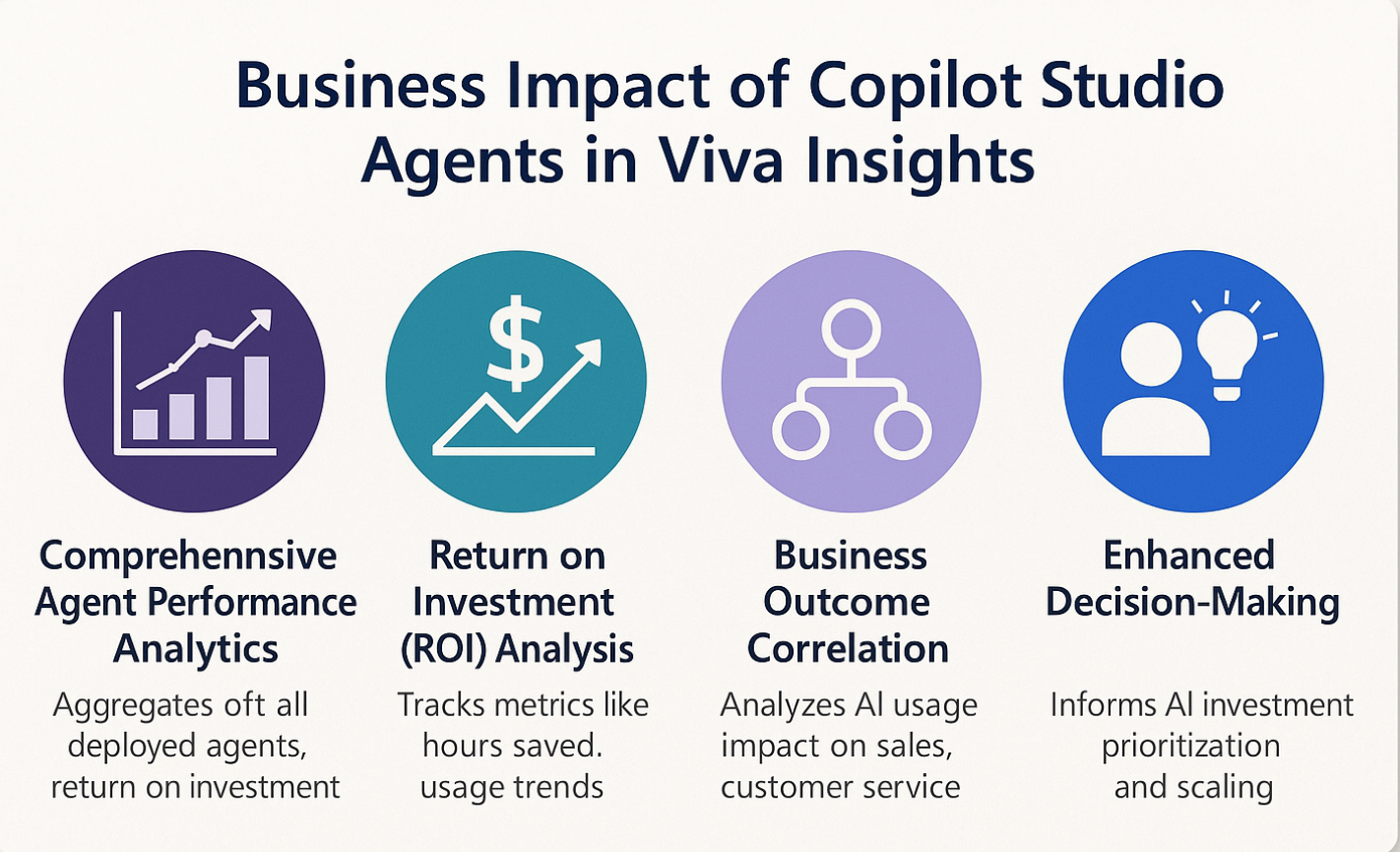
Analysing their business impact involves measuring key performance indicators such as time saved on routine tasks, improvements in employee engagement, and quality of decision making support.

Viva Insights leverages data from collaboration tools like Microsoft Teams and Outlook, enabling copilot agents to deliver actionable insights that reduce cognitive load and foster healthier work habits.

The analysis focuses on how these agents continue to increased efficiency, reduced burnout, and improve work-life balance.

Organizations can track metrics such as adoption rates, user feedback, and productivity improvements to assess the effectiveness of Copilot agents. Additionally, integrating feedback loops and sentiment analysis helps refine the AI’s assistance quality over time.

Overall evaluating Copilot Agents in Viva Insights provides a comprehensive understanding of their role in driving digital transformation, enhancing employee experience, and positively impacting organizational performance.

That’s it for today.

I hope this helps.

Malla Reddy Gurram(aka `@uk365guy)
Share this:

{Do you know} Analyze quality of responses that use generative AI in Copilot Studio

Hello Everyone,

Today I am going to share my thoughts on Copilot Studio’s new feature, the quality of responses that use generative AI.

Let’s get started.

Microsoft’s Copilot Studio introduced a new feature on June 17, 2025, enabling administrators, makers, marketers, and analysts to automatically analyse the quality of responses generated by AI copilots. This feature aims to provide actionable insights to enhance agent performance.

The evaluation framework for generative AI (GenAI) systems has been evolving to address the limitations of traditional lab-based assessments.

A comprehensive evaluation framework was proposed to assess GenAI systems in real-world scenarios, emphasising the need for dynamic and ongoing assessments that consider user intent, social dynamics, and emergent behaviours.

Additionally, Google Cloud introduced the GenAI evaluation service within Vertex AI, allowing users to evaluate generative models against predefined or custom criteria. This service supports various metrics, including accuracy, relevance, and user satisfaction, facilitating a more nuanced understanding of AI performance.

These developments reflect a broader trend towards more sophisticated and context-aware evaluations of generative AI systems, moving beyond traditional benchmarks to emcompass real-world performance and user experience.

That’s it for today.

I hope this helps.

Malla Reddy Gurram(@aka UK365GUY)

Share this:

{How to} Use your own model when generating responses in copilot studio.

Hello Everyone,

Today i am going to share my thoughts on how to use your own model when generating responses in copilot studio.

Let’s get’s started.

In Copilot Studio, you can enhance AI behavior and responses by integrating your own custom model instead of relying on the default GPT based assistant. This is particularly useful for organizations that have domain specific data, proprietary language models, or unique use cases that require tailored AI responses. By using own model, you gain greater control over responses logic, accuracy and compliance with general standards or regulations.

To use your own model in Copilot Studio, you typically configure it through plugin actions or APIs.

This involves settings up an external endpoint where your model is hosted(e.g., Azure ML, AWS SageMaker, or a self-hosted REST API). Then you create a plugin in Copilot Studio that calls your model’s API, passing in user input and returning the model’s responses.

You can then use this plugin as a custom action in topics, ensuring your bot routes user queries through your specific model when needed.

+———————+
| User Message |
+———————+
|
v
+————————–+
| Copilot Studio Topic |
+————————–+
|
v
+————————–+
| Custom Plugin Action | <-- Calls your model +--------------------------+ | v +--------------------------+ | Your Custom Model (API) | +--------------------------+ | v +--------------------------+ | Response to Copilot | +--------------------------+ | v +--------------------------+ | User Receives | | Model's Response | +--------------------------+ This setup allows you to combine Copilot's powerful orchestration tools with the unique reasoning and training of your own AI models. That's it for today. Malla Reddy Gurram(@aka UK365GUY) #365blogpostsin365days

Share this:

{How to } Resolve There was an issue delivering notifications. Refreshing the browser might help resolve the issue on Dynamics 365 Contact Center

Hello Everyone,

It’s been a while. I haven’t blogged.

Today i am going to show how to resolve this error message while accessing Dynamics 365 Contact Centre

There was an issue delivering notifications. Refreshing the browser might help resolve the issue. If this continues to exist, please have your admin contact Microsoft Support with Client Session ID: b0355776-6018-4800-83af-f2930d40a1fb. User a61d2c5e-0d24-f011-8c4e-6045bd0f8f2d doesn’t have required persona or roles

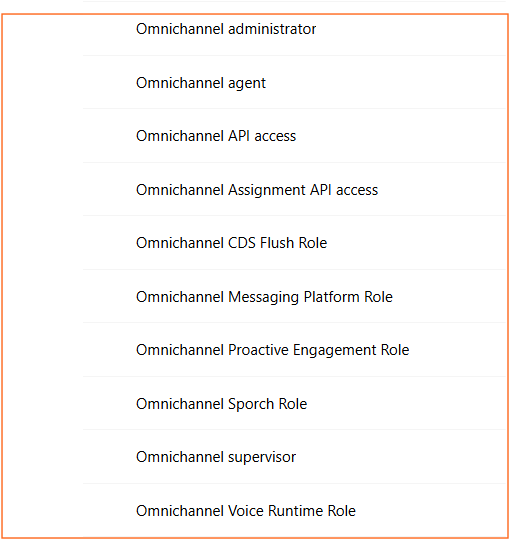
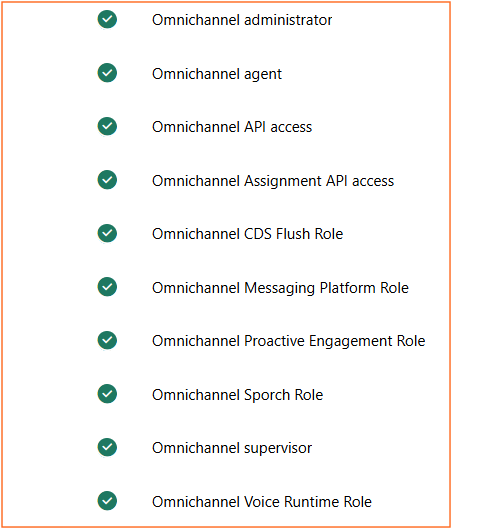
Error message is Users don’t have appropriate security roles assigned, as the Dynamics 365 Contact Centre has specific security roles which need to be assigned, even to the system administrator and system customiser roles assigned to the user.

The following are the security roles related to Dynamics 365 Contact Centre.

Assign the above roles to the user, and then the user will not get any error notifications on the screen when logged into Dynamics 365 Contact Centre.

That’s it for today.

I hope this helps.

Malla Reddy Gurram(@UK3655GUY)
#365Blogpostsin365days

Share this: