Menu Close

Category: Blog

{How to }PL 100 MICROSOFT POWER PLATFORM APP MAKER EXAM PREPARATION

Hello Everyone,

Preparing for Microsoft Certification PL 100 Microsoft Power Platform App Maker.
I have been following below procedure to get prepared well with this exam.
PL 100 Exam syllabus slightly changed from july 23rd 2021 Syllabus
Book exam from here
Microsoft Learn for PL 100 here
Create an environment community plan for practise from here
We can get the exam voucher for free if you attend one of the microsoft virtual training sessions.
please find link for virtual training from here 
Then you can start you learning process now.
Firstly if you have linkedin learning then please refer to the power platform introduction to Power BI, Power Apps, Power Automate, Power Virtual Agent from  Gini von courter videos here
Share this:

{How to} Activate a Retired Product in Dynamics 365 Field Service

Hello Everyone,

Today i am going to share simple tip on how to activate a retired product in Dynamics 365 Field Service.

Suppose you have retired a product which is expired. After sometime you need to activate the product.

On the Product record there will be Activate button, click on the Activate button.

Now you can see the Product record is in Active mode.

I hope this helps.

Malla Reddy(aka @UK365GUY)

Share this:

{How to } – { what is the impact of Delegated Email Approver security role in Dynamics 365 Customer Engagement }

Hello Everyone,

 
Today i am going to show when, how and why we need to give “Delegated Email Approver” security role to the system administrator to approve email for active mailbox.
 
Suppose you have a requirement to enable Dynamics 365 App for Outlook to the Dynamics 365 user, for that you need to approve the email for that user..
 
As a system administrator you login into Dynamics 365 Customer Engagement  and Advanced Settings  
 
> Administration > Email Configuration 


> Click on the Mailbox 
 
 
Then you can see active mailboxes, select the mailbox you want to approve as you can see below screenshot and highlighted, click on the “Approve Email” 


Then you will get the below error message saying only “Global Administrator or Exchange Administrator” roles can approve the email.


Solution: As system administrator can’t approve email because of unassigned the ” Delegated Email Approver” security role.

 
This role is only assign by either Global Administrator or Exchange Administrators only, system administrator can’t assign  Delegated Email Approver” security role by himself or herself.


So Global Admin should assign the  Delegated Email Approver” security role to the system admin to perform the ” Approve email” on Dynamics 365 to continue with the configuration of Dynamics 365 App for Outlook.


I hope this helps.
 
Malla Reddy {aka @UK365GUY }


Share this:

{How to} Scheduling recommendations in the Outlook add-in for Dynamics 365 Field Service Resource Scheduling

Hello Everyone,

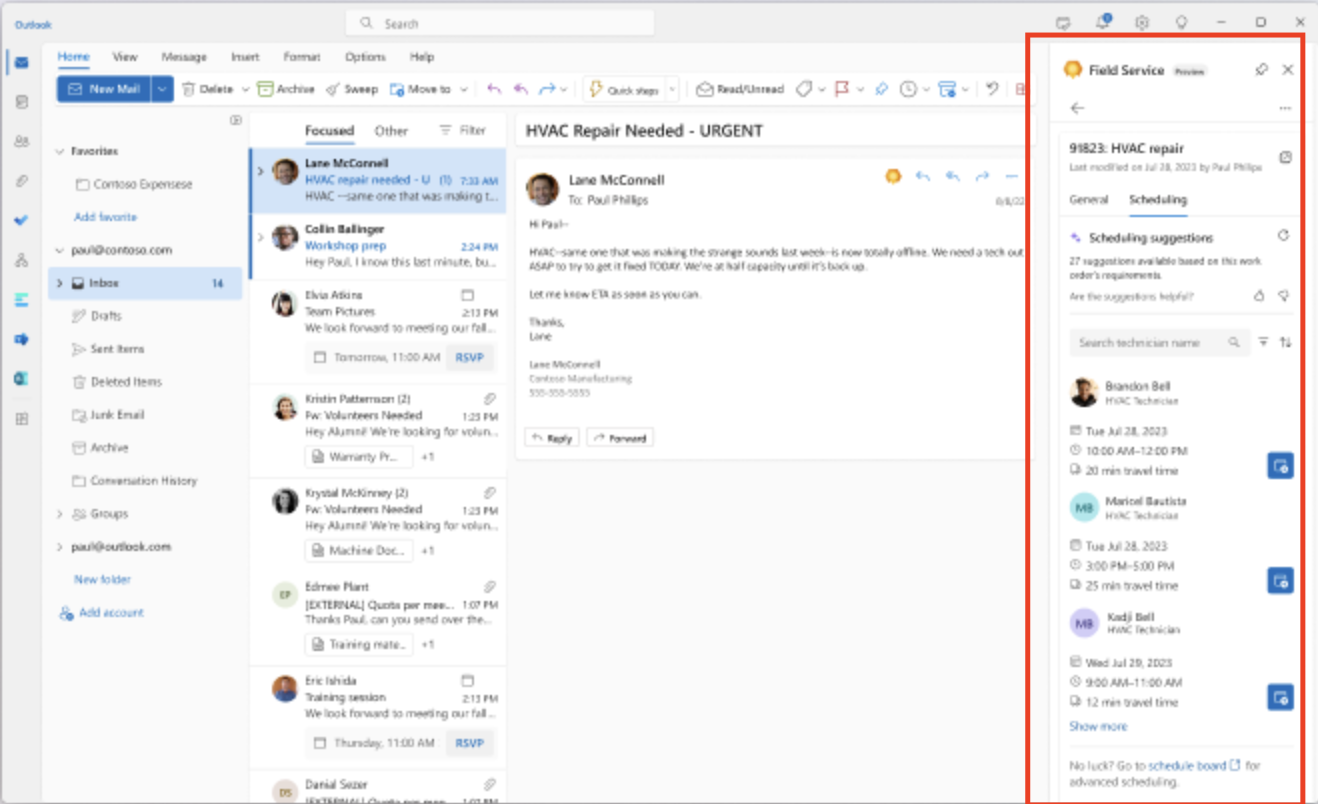
Today I am going to show how to schedule the recommeded resource from Outlook.

Let’s get’s started.

Resource schedular normally have daunting time when they need to schedule a resource for
emergency work order.

So an assistant recommends workers and time for the job, saving dispatchers time needed to validatted matched resources.

1. Frontline managers and dispatchers can get recommendations to choose technicians or frontline workers to schedule work orders based on attributes like availability, skills, or expertise.

2. The scheduling assistant based on the resource scheduling solution is now available in the Outlook add-in.

3. Which is part of Field Service Integartions for Microsoft 365 applications. The feature helps dispatchers schedule, reschedule, or move a booking for a work order. Scheduling suggestions are based on resource availability, skills, customer promised time windows, customer location proximity and business unit.

That’s it for today.

I hope this helps
Malla Reddy Gurram(@UK365GUY)
#365BlogPostsin365Days

Share this: