Menu Close

Category: Blog

Planning for Field Service Project Implementation

Hi Everyone,

Today i am going to share important points to be considered before implementing the Microsoft Dynamics 365 for Field Service Project.

Let’s get started.

Planning for Field Service:

Work Order Generation —> Schedule & Dispatch —> Service Delivery —> Review & Bill

Work Order creation: 
How and what information is entered based on the incoming call, email, portal or service agreement?
How does creator mark Work Order as ready to be scheduled.

Schedule and Dispatch:

How will dispatchers interact with Schedule Board, Schedule Assistant?

Perform Work On Site:

Field agents conduct work on site with mobile application. What pre-existing information does field technician need to access and what information he is entering.?

Review & Bill:
Back office reviews and approves completed work. How is follow up work dealt with? How are billing and inventory adjustments carried out?

I hope this helps.

For Microsoft Dynamics 365 Consultancy/Training/Support/Licensing
Contact us: https://www.gmritsolutions.co.uk
Email: admin@gmritsolutions.co.uk

Share this:

Microsoft Dynamics 365 Field Service Work Order Fields to be Noted

Hi Everyone,

I am going to share some key fields to be noted for Microsoft Dynamics 365 for Field Service Work Order.

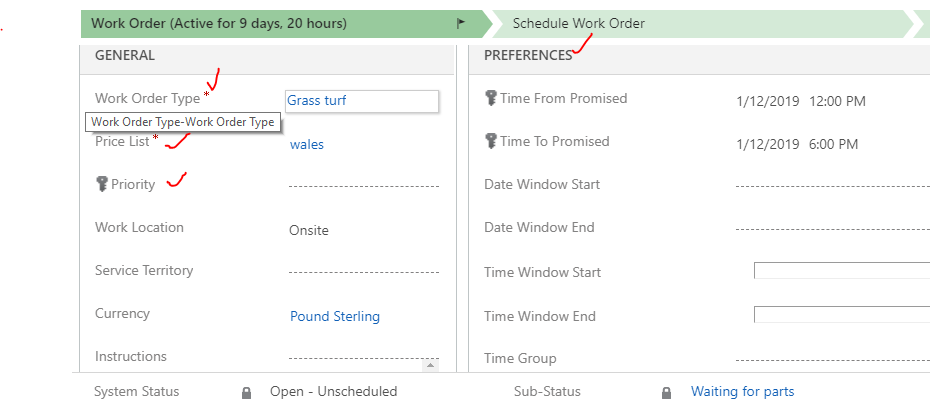
Work Order Type: Type of Work Order ( Inspection, Break Fix, Install etc.)
Work Order Price List: Price List is important in field service, so Price List attached to the Work Order.

Work Order Priority: Priority like ( Low, Normal, High)

Work  Location: Location where the work will be taking place.

Related to: Other records related to this Work Order
 – Parent Work Order
– Agreement
– Opportunity
– Case

Work Order Preferences: Specific time and date preferences for this work order 

Share this:

Microsoft Dynamics 365 for Field Service Work Order Status and Sub Status

Hi Everyone,

Today i am going to share my view on the Microsoft Dynamics 365 for Field Service Work Order Status(“System Status) and Sub-Status.

Work Order Status(System Status) :

Work Order Status: Work Order Status define the actual status of the Work Order when it is created. For a betterment of the Field Service Application it is better not to customize the lookup fields inside the System Status as there are workflows and OOTB functionality is relayed on them.

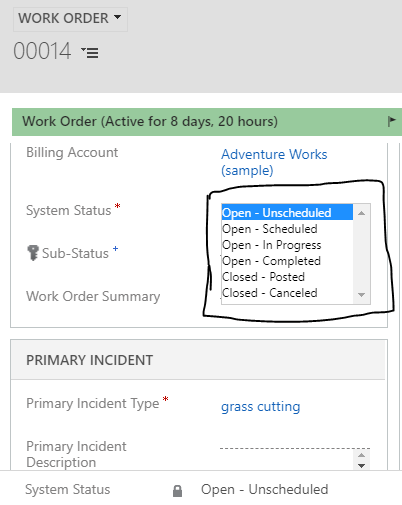
Below are the statuses of the OOTB Work Order:

Define the current state of the Work Order.

Status is updated as bookings are created and updated:

  1.   Out of the Box Status are:
  2.   Open- Unscheduled
  3.   Open – Scheduled
  4.   Open  – In Progress
  5.   Open – Completed
  6.   Closed – Posted
  7.   Closed – Cancelled

Because of workflow and other application functionality tied to Work Order statuses, it is recommended that customization of Work Order statuses is kept to minimum.

Work Order Sub- Status:

  1. Sub – Status is defines the additional details about the status of the Work Order.
  2. Sub – Status uses a lookup field to define its value.

It is used for triggering the scheduling functionality.


For instance:
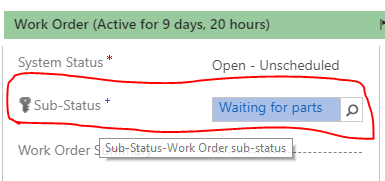
– Work Order Status: Open – Unscheduled
– Sub-Status: Waiting for parts

I hope this helps.

For Microsoft Dynamics 365 Consultancy/Training/Support/Licensing
Contact us: https://www.gmritsolutions.co.uk
Email: admin@gmritsolutions.co.uk
Share this:

Microsoft Dynamics 365 for Field Service Work Order Life Cycle

Hi Everyone,

Today i am going to share some information on how the Microsoft Dynamics 365 for Field Service Work Order Life Cycle.

What is the process to follow to complete the Work Order.

So let’s gets started.

Work Orders:- Work Order is a task to be completed for a Billing Account on Field Service.
so the main points to be remembered as follow:

-Capture essence of what needs to be performed.
-Used to coordinate and schedule resources and activities
-Can be used for different types of work such as installations, repairs, or preventatives maintenance.

Information of issue or work to be performed
– Description of issue or work to be performed
-Customer/Service Account
– Location
– Product (parts) and services that may be needed
– Tasks  or steps to Follow
– Priority and estimated duration
– Skills needed.

Work Order Life Cycle: The below are the steps in the Work Order Processing:

Work Order Creation -> Schedule -> Dispatch -> Service -> Review/Approval
what happens:
– New Work Order created
-Assigned incidents, products, services, Etc.

Who Performs:
-Agreements: Auto generated, or recurring
-Case:
-Opportunity
-Manual

Work Order Status:
-Open – unscheduled

Booking Status:
N/A

SCHEDULE:

What Happens:
– Bookable resource booking created
-Resources assigned
-Date and time specified

Who Performs:
– Dispatch(manually)
– Field Agent (Manually or Mobile)
– Dispatcher with help of scheduling assistant

Work Order Status:
– Open -Scheduled

Booking Status:
– Scheduled.

DISPATCH:

What Happens: 
-Field Agent notified of Work Oder.

Who Performs:
– Notification sent by system to Field Agent, Customer, or Others

Work Order Status:
– Open – scheduled

Booking Status:
– Scheduled
– (Custom Status)

SERVICE

What Happens:
– Work Order carried out
Who Performs:
– Field Agent

Work Order Status:
– Open – In Progress > Open – Completed

Booking Status:
– Travelling
– In Progress Completed.

REVIEW/APPROVAL

What Happens:
– Work done and information is accurate

Who Performs:
– Supervisor/Manager
– Back office accounting

Work Order Status:
– Open – Completed > Closed – Posted

Booking Status:
– Completed

I hope this helps.

For Microsoft Dynamics 365 Consultancy/Training/Support/Licensing
Contact us: https://www.gmritsolutions.co.uk
Email: admin@gmritsolutions.co.uk
  

Share this: