Menu Close

Category: Blog

Microsoft Dynamics 365 for Marketing

Hi Everyone,

As i am preparing for Microsoft Dynamics 365 for Marketing certification, hence the below notes.

Follow my blog through out my preparation, you might benefit with this notes in clearing certification:

Microsoft Dynamics 365 for Marketing main features:

Segments and List Management
Marketing Pages
Lead Management
Email Marketing
Customer Journey
Event Management
Survey Management

Microsoft Dynamics 365 for Marketing Capabilities:
Muli channel campaigns: Eail Marketing, Marketing pages & forms,
Webniar’s, phone calls & in-person events, LinkedIn connector

Lead Nurturing: Campaign designer, 360 degree view, Behavior based lead nurture, Lead prioritization.

Embedded Intelligence: Multiple lead scoring, Dynamic segmentation, customer Insights, Notifications

Event Management: Webniar’s using ON24 , Events Portal, Attendance tracking, Speaker management

Reporting: Dashboards, Surveys, Embedded PowerBI, Configurable.

Marketing campaigns are most effective when they are targeted at a group of individuals who have a higher level of interest in the subject matter of the campaign. As such, it makes sense to strategically divide contacts with like-minded interests or based on key data points into groups – or segments – that can then be leveraged to more effectively target a campaign to the appropriate audience.​

Dynamics 365 for Marketing uses segments in two important ways: ​

Customer journeys: Most customer journeys start with a segment tile, which establishes the collection of contacts that will experience the customer journey. You can combine multiple segments in a journey.

Subscription lists: Subscription lists are static lists that contacts then add themselves to (or remove themselves from) using a subscription center. ​

Dynamics 365 for Marketing fully supports segmentation using the Segment entity, with these records primarily being used when architecting customer journeys or in relation to subscription lists. There are three types of segment records that can be created:​

Dynamic Segment: As the name implies, a dynamic segment is a group of contacts built from a defined expression or query.​

Static Segment: If contacts cannot be logically grouped using a query, then a static segment can also be used. Contacts can be selectively added to a static segment on a per-contact basis. Static segments are usually based on Marketing Lists so contacts can opt-in or opt-out of static segments by using a Subscription Center. These features are described later in this module.​

Compound Segment: This type of segment combines the virtues of both dynamic and static segments. Contacts can be added using an expression or query, or they can be selectively added.​

Dynamics 365 for Marketing works together with another product called Dynamics 365 for Customer Insights to provide advanced segment definitions and customer analytics. The integration is seamless and results in powerful combined functionality when the two systems work together. As your contact records and marketing lists are continuously synchronized, Customer Insights apply its powerful data processing and analytical tools to your contacts, along with information from other types of Dynamics 365 records and systems.

You can access Customer Insights directly to make use of its additional analytical tools and features. ​

I hope this helps:

For Microsoft Dynamics 365 Training/Consultancy/Support/Licensing
Contact us: www.gmritsolutions.co.uk
Email: admin@gmritsolutions.co.uk
Share this:

Microsoft Dynamics 365 Training

Hi Everyone,

I am happy to share about our Company  GMR IT SOLUTIONS LIMITED  has been  successfully delivering

Microsoft Dynamics 365 Training for customers SMB’S , SME’s, Corporate Customers and End Client’s across United Kingdom.

Dynamics 365 Customer Engagement
{Customer Service, Sales, Marketing}
Customizations,Solutions,Integration,Relationships, Web Resources, process,Plugin,Business Rules, Workflow, Dashboards and Charts, Report.
Power BI
Connecting With Data,Query Editor, Data Models, Data Visualizations,DAX,Reports and Dashboard.
Voice of customer: 
Installation and Configuration, Plan Survey, Design and Distribute Survey, Design an Advance survey, Analyze survey data
Project Service Automation:
Opportunity Management, Project Planning, Resource Management, Team Collaboration, Time and Expenses, Customer Billing, Service Analytics
Field Service:
Setup and Configure Field Service, Manage Work Order, Schedule and dispatch work orders, Manage Field service mobility , manage inventory and purchasing, manage the connected field service solutions, manage agreements.
Portals:
Create and design Portals,Manage and configure Portals, Manage and Customize Content.
Unified Service Desk:
Installation, Create Hosted Connection, Toolbar, Search function, session Lines, Association View
Gamification:
Configuration and Setup, Activation , Manage KPI Run Games, gamification Setting, Point Scoring, Schedule emails, Weekly awards, Configure stream tv.
Azure
Introduction and Overview, Building Application, Infrastructure,Strong, Data, Securing Azure Applications.
Talent: Onboard, HR and Core HR.
Business Central:
Finance and Operations:

Organisations looking for trainers
Get in touch:

www.gmritsolutions.co.uk
Email: Admin@gmritsolutions.co.uk

Share this:

Microsoft Dynamics 365 New Admin Center Preview

Hi Everyone,

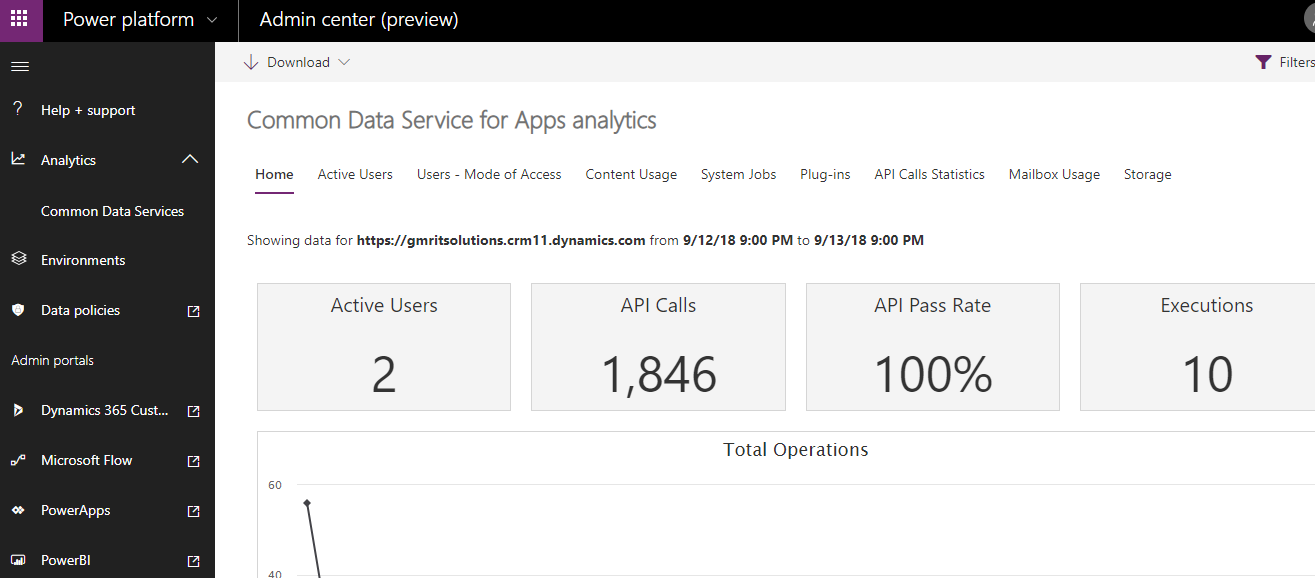
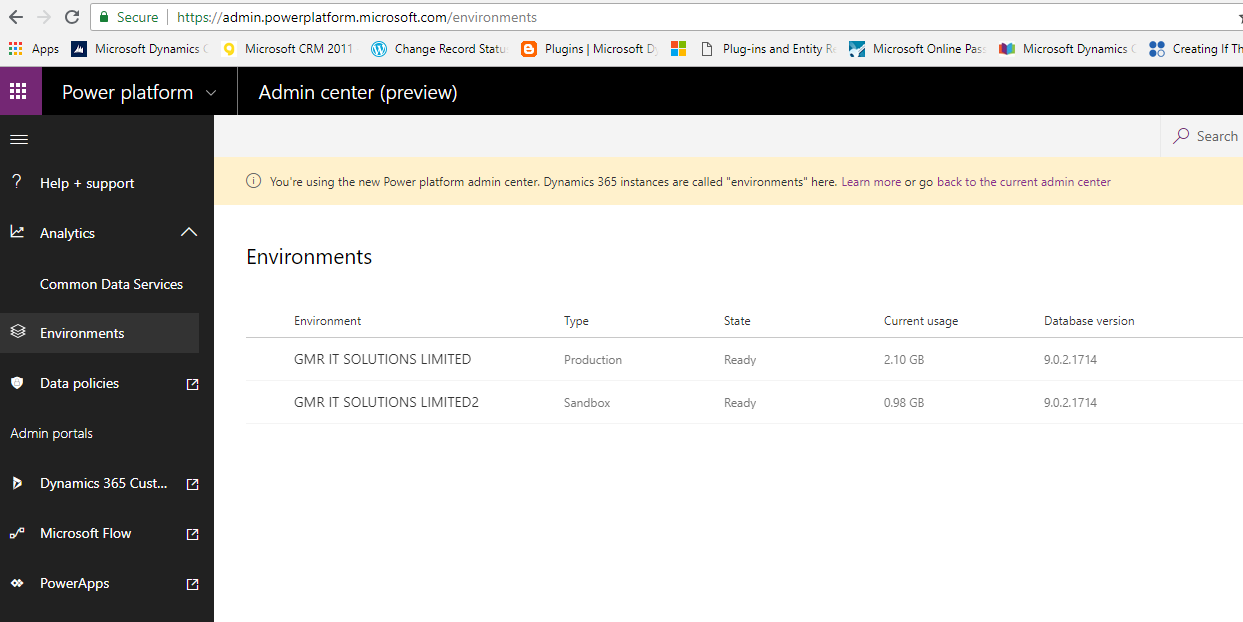
Have you noticed new Microsoft Dynamics 365 Admin Center preview:

As you can see new enhancement of the Dynamics 365 Admin center, you can see enriched view for instance the environments  have clear view of the environment name, Type, State, Current Usage, Database Version.

Looking at the left hand side of the screen the “help + support”: you can request for support request.
> Analytics :

   Common Data Services : CDS shows the active users, User-Mode of Access, Content Usage, System Jobs, Plug-ins, API Calls Statistics, Mailbox Usage, Storage

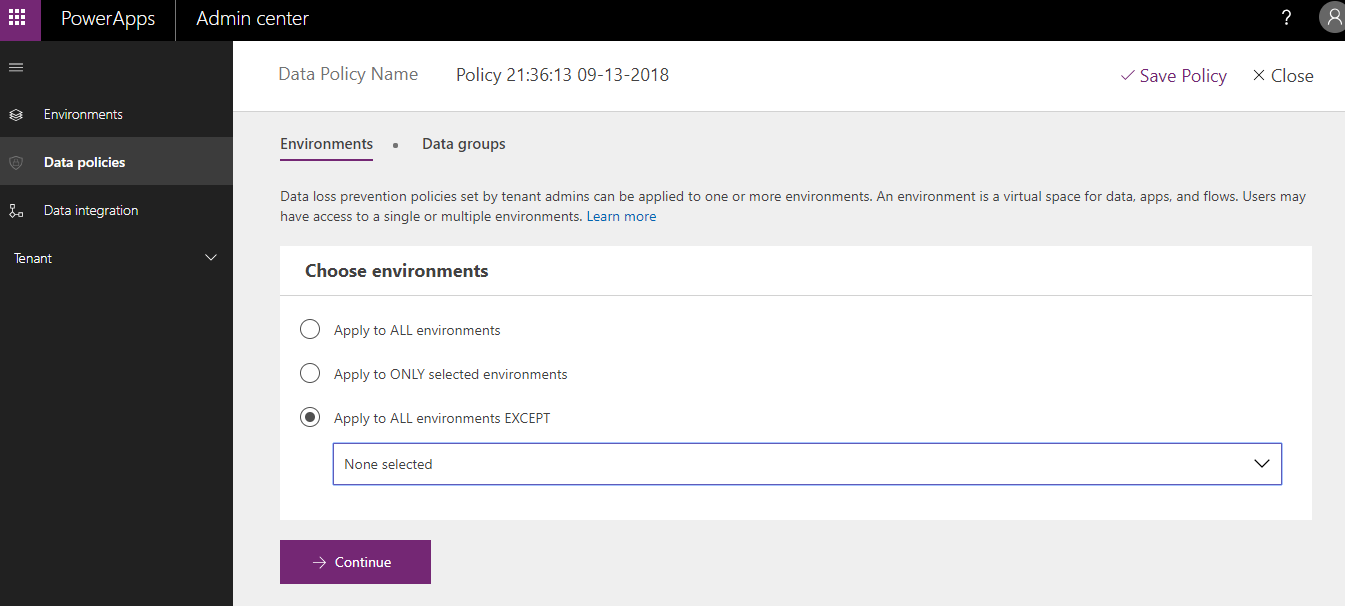
Data Policies: Data loss prevention policies set by tenant admins can be applied to one or more environments. An environment is a virtual space for data, apps, and flows. Users may have access to a single or multiple environments.

You can create new policy according to your Organisation requirement.

There are options like
1) Apply to ALL environments
2) Apply to ONLY selected environments : If you have multiple environments like dev, test and productions.
3) Apply to ALL environments EXCEPT : Similar kind of choosing except the selected environment.

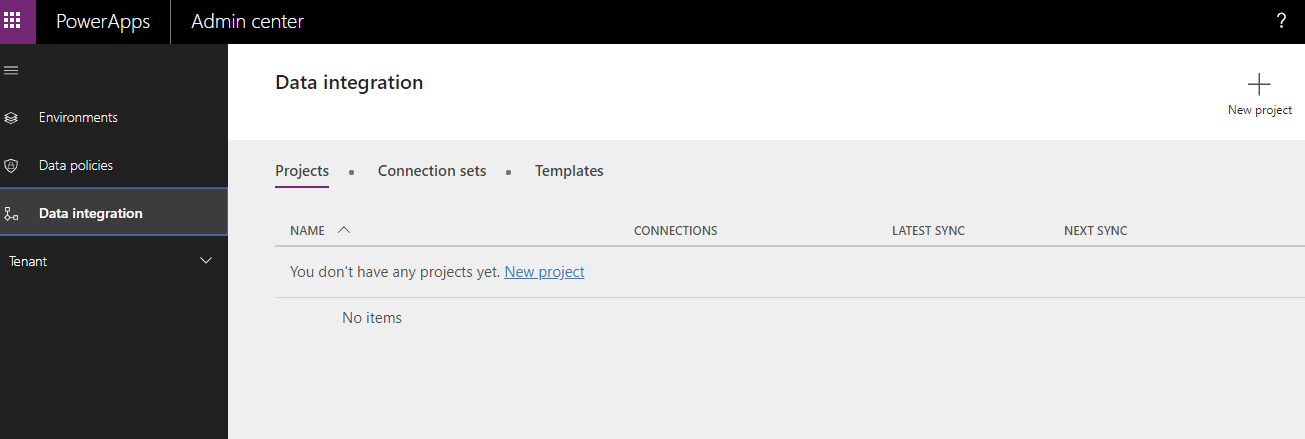
Data Integration:

Project: You can  create new project and can create connection sets for Data Integration.

Tenant: Expand the tenant then you should have capability to see the list of active users licenses and Quotas about the total Flow run on the environment.

Moving on to the Admin Portals;

> Dynamics 365 Customer Engagement: when accessed this link it will navigate to the dynamics 365.
> Microsoft Flow: Navigate to the home page of Microsoft Flow.
> PowerApps: Navigate to the home page of Power Apps
> PowerBI: Navigate to the home page of PowerBI.

I hope this helps.

For consultation/Training Visit www.gmritsolutions.co.uk or reach out to us at admin@gmritsolutions.co.uk

Share this:

Microsoft Dynamics 365 Virtual Entity

Hi Everyone,

Today i am going to share views on the Virtual Entity which is added to Dynamics 365 in October 2017 release.

When the Virtual Entity might be useful?

Scenario’s:

1) You have data in another system that only needs to be viewed in Dynamics 365.

2)  Highly sensitive data in an external system that you don’t want to be stored in Dynamics 365.

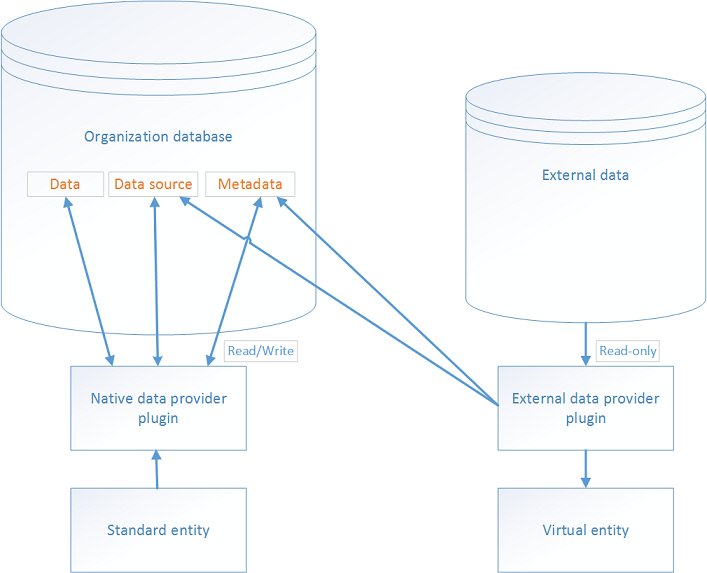
Virtual entities are made up of three main components, a data provider, a data source record, and a virtual entity.


 Virtual Entities are an alternative to client-side and server-side approaches for connecting external data with Dynamics 365 with a solution that is significantly easier to configure and manage.

As the name itself states the “Virtual”, which is not physically exists.

The Virtual entity is quite useful in integrations scenario’s like Microsoft Dynamics 365 Integration with a third party system.

Where the data from third party system will not be stored physically on Dynamics 365  database  to avoid data replication.

The data will be “read only” with the first release of this new feature.

User can not update the data on the virtual entity but can be used in dashboard, viewed in advanced finds, views, query purposes only.

Can not run the workflows or business process flows on the virtual entity. Hopefully in next releases more functionality will be added to virtual entity.

Image from Microsoft 

Virtual entity creation and mapping

Initially, defining a virtual entity is the same as defining a custom entity: you specify the entity, attributes, and relationships for the new virtual entity type. However, additionally, you then connect the virtual entity to a data provider to manage data retrieval. 
The custom entity type and its fields must be mapped to the corresponding data in the external data source. For example, a virtual entity might be represented as a row in an external relational database, and each of its fields might correspond to a column in that row. 
(Note that these external data names are often different than their corresponding virtual entity names.) 
A specific, required mapping occurs for the entity ID field: the data provider must be able to provide this GUID and associate it to the external record that represents this entity instance. 
The most direct way to achieve this is to actually use GUIDs as primary keys in the external data source.

Limitations of Virtual Entities

 There are some limitations to virtual entities that you need to be aware of when evaluating whether you can use virtual entities with your external data.
Data is read-only. The virtual entity feature doesn’t support pushing changes made in Dynamics 365 back to the external system.
Only organization-owned entities are supported. The security filtering applied to user-owned entities is not supported. Access to the virtual entity data can be turned on or off for individual users based on their security role. Field-level security is not supported.
It must be possible to model the external data as a Dynamics 365 entity. This means:
> All entities in the external data source must have an associated GUID primary key.
> All entity properties must be represented as Dynamics 365 attributes. You can use simple types     representing text, numbers, optionsets, dates, images, and lookups.
> You must be able to model any entity relationships in Dynamics 365.
> An attribute on a virtual entity cannot be calculated or rollup. Any desired calculations must be     done on the external side, possibly within or directed by the data provider.
> Auditing and change tracking is not supported. These may be implemented within the external data store.
Virtual entities cannot be enabled for queues.
Offline caching of values is not supported for virtual entities.
A virtual entity cannot represent an activity and do not support business process flows.
Once created, a virtual entity cannot be changed to be a standard (non-virtual) entity. The reverse is also true: a standard entity cannot be converted into a virtual entity.

Virtual Entity and OData 4

If you need Azure Cosmos DB (formerly Microsoft Document DB), a virtual entity provider is available from AppSource. And for everything else you have two options:
Using the Dynamics 365 Data SDK, .NET Developers have the option of creating custom virtual entity data providers to help integrate external data source types that are not supported by an existing data provider.
You can see on the custom virtual entity data providers page, is to create an OData v4 interface to your external data source, so that you can directly access it with the supplied standard OData v4 Data Provider.
I hope this helps.
For consultation/Training Visit  www.gmritsolutions.co.uk or reach out to us at admin@gmritsolutions.co.uk

Share this: