1) create field on opportunity form
2) structure of the plugin crm explorer add steps and register the image
(using plugin registration tool, as developer tool kit have bug at this moment.)
3)update of attribute of approval status on opportunity entity to test the scenario.
Create a new field optionset as approval status on opportunity entity with optionset values as
Submitted = 100000000
Pending approval = 100000001
Approved = 100000002
1)Condition when Approval status changes from Pending approval to Approved.
2)Share the record with a system user with read access only.
3)Find out how to share the record to system user using plugin…..
#GrantaccessRequest
#PostImage
I am using Developer toolkit for visual studio 2013 for this plugin..
Plugin code here
// <copyright file=”PostOperationopportunityUpdate.cs” company=””>
// Copyright (c) 2017 All Rights Reserved
// </copyright>
// <author></author>
// <date>3/16/2017 5:10:33 PM</date>
// <summary>Implements the PostOperationopportunityUpdate Plugin.</summary>
// <auto-generated>
// This code was generated by a tool.
// Runtime Version:4.0.30319.1
// </auto-generated>
using System;
using System.ServiceModel;
using Microsoft.Crm.Sdk.Messages;
using Microsoft.Xrm.Sdk;
using Microsoft.Xrm.Sdk.Query;
namespace CrmPackage1.Plugins1
{
/// <summary>
/// PostOperationopportunityUpdate Plugin.
/// Fires when the following attributes are updated:
/// new_approvalstatus
/// </summary>
public class PostOperationopportunityUpdate : PluginBase
{
/// <summary>
/// Initializes a new instance of the <see cref=”PostOperationopportunityUpdate”/> class.
/// </summary>
/// <param name=”unsecure”>Contains public (unsecured) configuration information.</param>
/// <param name=”secure”>Contains non-public (secured) configuration information.
/// When using Microsoft Dynamics 365 for Outlook with Offline Access,
/// the secure string is not passed to a plug-in that executes while the client is offline.</param>
public PostOperationopportunityUpdate(string unsecure, string secure)
: base(typeof(PostOperationopportunityUpdate))
{
// TODO: Implement your custom configuration handling.
}
/// <summary>
/// Main entry point for he business logic that the plug-in is to execute.
/// </summary>
/// <param name=”localContext”>The <see cref=”LocalPluginContext”/> which contains the
/// <see cref=”IPluginExecutionContext”/>,
/// <see cref=”IOrganizationService”/>
/// and <see cref=”ITracingService”/>
/// </param>
/// <remarks>
/// For improved performance, Microsoft Dynamics 365 caches plug-in instances.
/// The plug-in’s Execute method should be written to be stateless as the constructor
/// is not called for every invocation of the plug-in. Also, multiple system threads
/// could execute the plug-in at the same time. All per invocation state information
/// is stored in the context. This means that you should not use global variables in plug-ins.
/// </remarks>
protected override void ExecuteCrmPlugin(LocalPluginContext localContext)
{
if (localContext == null)
{
throw new InvalidPluginExecutionException(“localContext”);
}
// TODO: Implement your custom Plug-in business logic.
Entity opp = (Entity)localContext.PluginExecutionContext.InputParameters[“Target”];
if (opp.LogicalName != “opportunity”)
return;
else
{
if (localContext.PluginExecutionContext.PostEntityImages.Contains(“PostImage”) && localContext.PluginExecutionContext.PostEntityImages[“PostImage”] is Entity)
{
Entity postImage = (Entity)localContext.PluginExecutionContext.PostEntityImages[“PostImage”];
if (postImage.Attributes.Contains(“new_approvalstatus”))
{
//submitted->approved
//submitted->
OptionSetValue OPT = new OptionSetValue();
OPT = (OptionSetValue)postImage.Attributes[“new_approvalstatus”];
//100000000
if (OPT.Value==100000002)
{
//Share record
#region get user details
String fetchXml = @”<fetch version=’1.0′ output-format=’xml-platform’ mapping=’logical’ distinct=’false’>
<entity name=’systemuser’>
<attribute name=’fullname’ />
<attribute name=’businessunitid’ />
<attribute name=’title’ />
<attribute name=’address1_telephone1′ />
<attribute name=’positionid’ />
<attribute name=’systemuserid’ />
<order attribute=’fullname’ descending=’false’ />
<filter type=’and’>
<condition attribute=’internalemailaddress’ operator=’eq’ value=’dilipkumar@gmrltd.onmicrosoft.com’ />
</filter>
</entity>
</fetch>”;
//THis will convert in Query base
FetchExpression query = new FetchExpression(fetchXml);
EntityReference teamReference = new EntityReference();
EntityCollection entcollection = localContext.OrganizationService.RetrieveMultiple(query);
for (int i = 0; i < entcollection.Entities.Count; i++)
{
teamReference = new EntityReference(“systemuser”, entcollection.Entities[i].Id);
}
#endregion
#region Share record with read access
GrantAccessRequest grantAccessRequest = new GrantAccessRequest();
grantAccessRequest.Target = new EntityReference(opp.LogicalName, opp.Id);
PrincipalAccess principalAccess = new PrincipalAccess();
principalAccess.AccessMask = AccessRights.ReadAccess;
principalAccess.Principal = teamReference;
grantAccessRequest.PrincipalAccess = principalAccess;
GrantAccessResponse grantAccessResponse = (GrantAccessResponse)localContext.OrganizationService.Execute(grantAccessRequest);
#endregion
}
}
else
{
return;
}
}
}
}
}
}

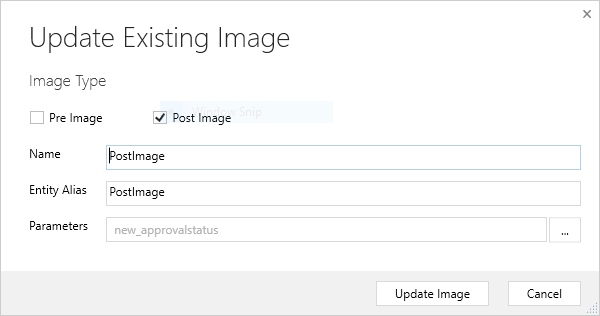
I have created this plugin using Developer tool kit on dynamic 365..
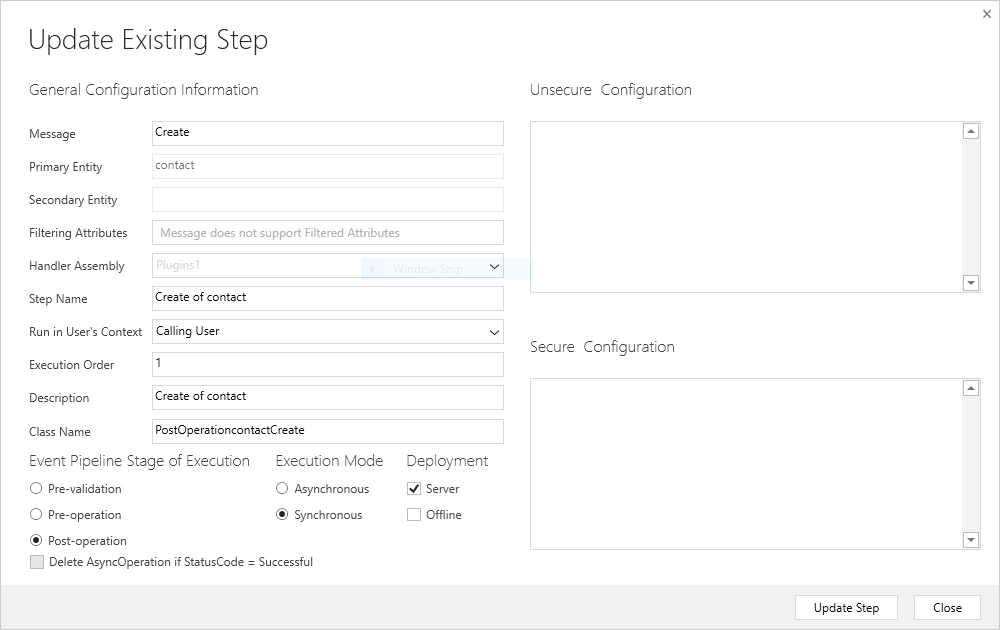
STEPS:
MESSAGE : Create
EVENT PIPELINE STAGE OF EXECUTIONS :Post Operation
EXECUTION MODE: synchronous
DEPLOYMENT : Server
// <copyright file=”PostOperationaccountCreate.cs” company=””>
// Copyright (c) 2017 All Rights Reserved
// </copyright>
// <author></author>
// <date>3/14/2017 4:15:03 PM</date>
// <summary>Implements the PostOperationaccountCreate Plugin.</summary>
// <auto-generated>
// This code was generated by a tool.
// Runtime Version:4.0.30319.1
// </auto-generated>
using System;
using System.ServiceModel;
using Microsoft.Crm.Sdk.Messages;
using Microsoft.Xrm.Sdk;
using Microsoft.Xrm.Sdk.Query;
namespace SamplePlugin1
{
/// <summary>
/// PostOperationaccountCreate Plugin.
/// </summary>
public class PostOperationaccountCreate : PluginBase
{
/// <summary>
/// Initializes a new instance of the <see cref=”PostOperationaccountCreate”/> class.
/// </summary>
/// <param name=”unsecure”>Contains public (unsecured) configuration information.</param>
/// <param name=”secure”>Contains non-public (secured) configuration information.
/// When using Microsoft Dynamics 365 for Outlook with Offline Access,
/// the secure string is not passed to a plug-in that executes while the client is offline.</param>
public PostOperationaccountCreate(string unsecure, string secure)
: base(typeof(PostOperationaccountCreate))
{
// TODO: Implement your custom configuration handling.
}
/// <summary>
/// Main entry point for he business logic that the plug-in is to execute.
/// </summary>
/// <param name=”localContext”>The <see cref=”LocalPluginContext”/> which contains the
/// <see cref=”IPluginExecutionContext”/>,
/// <see cref=”IOrganizationService”/>
/// and <see cref=”ITracingService”/>
/// </param>
/// <remarks>
/// For improved performance, Microsoft Dynamics 365 caches plug-in instances.
/// The plug-in’s Execute method should be written to be stateless as the constructor
/// is not called for every invocation of the plug-in. Also, multiple system threads
/// could execute the plug-in at the same time. All per invocation state information
/// is stored in the context. This means that you should not use global variables in plug-ins.
/// </remarks>
protected override void ExecuteCrmPlugin(LocalPluginContext localContext)
{
if (localContext == null)
{
throw new InvalidPluginExecutionException(“localContext”);
}
// Obtain the target entity from the input parameters.
Entity entity = (Entity)localContext.PluginExecutionContext.InputParameters[“Target”];
//</snippetFollowupPlugin2>
// Verify that the target entity represents an account.
// If not, this plug-in was not registered correctly.
if (entity.LogicalName != “account”)
return;
try
{
// Create a task activity to follow up with the account customer in 7 days.
Entity followup = new Entity(“task”);
followup[“subject”] = “Send e-mail to the new customer.”;
followup[“description”] = “Follow up with the customer. Check if there are any new issues that need resolution.”;
followup[“scheduledstart”] = DateTime.Now.AddDays(7);
followup[“scheduledend”] = DateTime.Now.AddDays(7);
followup[“category”] = entity.LogicalName;
followup[“regardingobjectid”] = new EntityReference(“account”, entity.Id);
Guid taskid = localContext.OrganizationService.Create(followup);
// Assign the task created to #malla (another user when new account is created.)
String fetchXml = @”<fetch version=’1.0′ output-format=’xml-platform’ mapping=’logical’ distinct=’false’>
<entity name=’systemuser’>
<attribute name=’fullname’ />
<attribute name=’businessunitid’ />
<attribute name=’title’ />
<attribute name=’address1_telephone1′ />
<attribute name=’positionid’ />
<attribute name=’systemuserid’ />
<order attribute=’fullname’ descending=’false’ />
<filter type=’and’>
<condition attribute=’internalemailaddress’ operator=’eq’ value=’mallagurram@gmrltd.onmicrosoft.com’ />
</filter>
</entity>
</fetch>”;
//THis will convert in Query base
FetchExpression query = new FetchExpression(fetchXml);
EntityCollection entcollection = localContext.OrganizationService.RetrieveMultiple(query);
for (int i = 0; i < entcollection.Entities.Count; i++)
{
AssignRequest assign = new AssignRequest
{
Assignee = new EntityReference(“systemuser”, entcollection.Entities[i].Id),
Target = new EntityReference(“task”, taskid)
};
localContext.OrganizationService.Execute(assign);
}
// Execute the Request
//// Execute the Request
//localContext.OrganizationService.Execute(assign);
//AssignRequest assign = new AssignRequest
//{
// Assignee = new EntityReference(“systemuser”,string[“internalemailaddress”],”mallagurram@gmrltd.onmicrosoft.com”),
// Target = new EntityReference(“task”, taskid)
//};
}
//<snippetFollowupPlugin3>
catch (FaultException<Microsoft.Xrm.Sdk.OrganizationServiceFault> ex)
{
throw new InvalidPluginExecutionException(“An error occurred in the FollowupPlugin plug-in.”, ex);
}
}
}
}
// <copyright file=”PostOperationcontactCreate.cs” company=””>
// Copyright (c) 2017 All Rights Reserved
// </copyright>
// <author></author>
// <date>3/14/2017 5:02:56 PM</date>
// <summary>Implements the PostOperationcontactCreate Plugin.</summary>
// <auto-generated>
// This code was generated by a tool.
// Runtime Version:4.0.30319.1
// </auto-generated>
using System;
using System.ServiceModel;
using Microsoft.Crm.Sdk.Messages;
using Microsoft.Xrm.Sdk;
using Microsoft.Xrm.Sdk.Query;
namespace CrmPackage1.Plugins1
{
/// <summary>
/// PostOperationcontactCreate Plugin.
/// </summary>
public class PostOperationcontactCreate : PluginBase
{
/// <summary>
/// Initializes a new instance of the <see cref=”PostOperationcontactCreate”/> class.
/// </summary>
/// <param name=”unsecure”>Contains public (unsecured) configuration information.</param>
/// <param name=”secure”>Contains non-public (secured) configuration information.
/// When using Microsoft Dynamics 365 for Outlook with Offline Access,
/// the secure string is not passed to a plug-in that executes while the client is offline.</param>
public PostOperationcontactCreate(string unsecure, string secure)
: base(typeof(PostOperationcontactCreate))
{
// TODO: Implement your custom configuration handling.
}
/// <summary>
/// Main entry point for he business logic that the plug-in is to execute.
/// </summary>
/// <param name=”localContext”>The <see cref=”LocalPluginContext”/> which contains the
/// <see cref=”IPluginExecutionContext”/>,
/// <see cref=”IOrganizationService”/>
/// and <see cref=”ITracingService”/>
/// </param>
/// <remarks>
/// For improved performance, Microsoft Dynamics 365 caches plug-in instances.
/// The plug-in’s Execute method should be written to be stateless as the constructor
/// is not called for every invocation of the plug-in. Also, multiple system threads
/// could execute the plug-in at the same time. All per invocation state information
/// is stored in the context. This means that you should not use global variables in plug-ins.
/// </remarks>
protected override void ExecuteCrmPlugin(LocalPluginContext localContext)
{
if (localContext == null)
{
throw new InvalidPluginExecutionException(“localContext”);
}
// TODO: Implement your custom Plug-in business logic.
if (localContext.PluginExecutionContext.InputParameters.Contains(“Target”) && localContext.PluginExecutionContext.InputParameters[“Target”] is Entity)
{
// Obtain the target entity from the input parameters.
Entity entity = (Entity)localContext.PluginExecutionContext.InputParameters[“Target”];
//</snippetFollowupPlugin2>
// Verify that the target entity represents an account.
// If not, this plug-in was not registered correctly.
if (entity.LogicalName != “contact”)
return;
try
{
// Create a task activity to follow up with the account customer in 7 days.
Entity followup = new Entity(“task”);
followup[“subject”] = “Send e-mail to the new customer.”;
followup[“description”] =
“Follow up with the customer. Check if there are any new issues that need resolution.”;
followup[“scheduledstart”] = DateTime.Now.AddDays(7);
followup[“scheduledend”] = DateTime.Now.AddDays(7);
followup[“category”] = localContext.PluginExecutionContext.PrimaryEntityName;
followup[“regardingobjectid”] = new EntityReference(“contact”, entity.Id);
//<snippetFollowupPlugin4>
// Obtain the organization service reference.
//</snippetFollowupPlugin4>
// Create the task in Microsoft Dynamics CRM.
localContext.Trace(“FollowupPlthugin: Creating the task activity.”);
Guid taskid = localContext.OrganizationService.Create(followup);
// Assign the task created to #malla (another user when new account is created.)
AssignRequest assign = new AssignRequest
{
Assignee = new EntityReference(“systemuser”, localContext.PluginExecutionContext.UserId),
Target = new EntityReference(“task”, taskid)
};
localContext.OrganizationService.Execute(assign);
}
//<snippetFollowupPlugin3>
catch (FaultException<Microsoft.Xrm.Sdk.OrganizationServiceFault> ex)
{
throw new InvalidPluginExecutionException(“An error occurred in the FollowupPlugin plug-in.”, ex);
}
}
}
}
}